
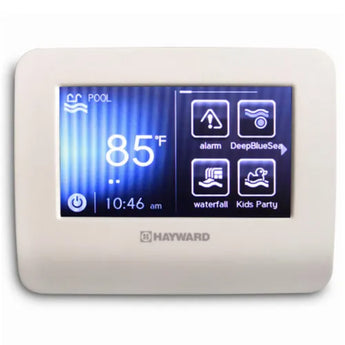

Hayward HLWALLMOUNT OmniLogic Wired Wall-Mount Touchscreen Remote
The Hayward HLWALLMOUNT is a wired touchscreen remote that mounts on a wall and connects to an OmniLogic pool automation controller. It runs the same functions as the OmniLogic's own screen, apart from Service Mode and some setup options.
- Genuine Hayward part HLWALLMOUNT
- Works with all OmniLogic controls (one per system)
- Wires to the OmniLogic's RS-485 terminals
- 4-conductor cable, up to 350 ft on 20 AWG
- Indoor or weather-protected mounting
Description
The Hayward HLWALLMOUNT is a wired touchscreen remote that mounts on a wall and connects to an OmniLogic pool automation controller. It runs the same functions as the OmniLogic's own screen, apart from Service Mode and some setup options.
- Genuine Hayward part HLWALLMOUNT
- Works with all OmniLogic controls (one per system)
- Wires to the OmniLogic's RS-485 terminals
- 4-conductor cable, up to 350 ft on 20 AWG
- Indoor or weather-protected mounting
Shipping & Returns
Shipping: We offer free standard shipping on all orders within the contiguous United States (lower 48). We do not currently ship to Alaska, Hawaii, or Puerto Rico. Any other restrictions will be shown at checkout. We do not currently ship internationally. Orders ship within 1 to 2 business days, and delivery typically takes 4 to 6 business days after shipping, for a total of about 5 to 8 business days from your order date.
Tracking information is emailed once your order ships. We do not currently offer international shipping. See our full Shipping Policy for full details.
Returns: Unused items in their original packaging may be returned within 30 days of delivery. To start a return, request a Return Merchandise Authorization (RMA) by emailing support@nationalpoolsupply.com or calling +1 978-222-0628 with your order number and the reason for the return (include photos if the item is defective, damaged, or incorrect). Once your RMA is approved, ship the item with your RMA number to: DHB Enterprises LLC / National Pool Supply, 30 Log Bridge Rd, Building 300, Unit 301, Middleton, MA 01949. Change-of-mind returns: you pay return shipping, and a 15% restocking fee applies; original shipping costs are not refunded. Defective, damaged, or incorrect items reported within 30 days of delivery are returned at no cost to you with a prepaid label, and no restocking fee applies. See our full Refund and Returns Policy for full details.
Warranty
Manufacturer Warranty:
This product carries the manufacturer's warranty, where applicable. Warranty terms, coverage, and exclusions are set by the manufacturer. Warranty claims are filed directly with the manufacturer; we do not process warranty claims or offer a separate warranty of our own. If you need the manufacturer's contact details, contact us and we will share them. See our Warranty page for details.
 U.S. Based Company
 Premium Products
 Trusted Pool & Spa BrandsEducation & ResourcesU.S. Based CompanyPremium ProductsTrusted Pool & Spa BrandsEducation & ResourcesU.S. Based CompanyPremium ProductsTrusted Pool & Spa BrandsEducation & ResourcesU.S. Based CompanyPremium ProductsTrusted Pool & Spa BrandsEducation & ResourcesU.S. Based CompanyPremium ProductsTrusted Pool & Spa BrandsEducation & ResourcesU.S. Based CompanyPremium ProductsTrusted Pool & Spa BrandsEducation & Resources
Hayward HLWALLMOUNT OmniLogic Wired Wall-Mount Touchscreen Remote
- Part #
- HLWALLMOUNT
- Brand
- Hayward
- Connection
- High-speed RS-485 screw terminals 1–4 (terminal 5 unused on t...
The HLWALLMOUNT puts OmniLogic control inside the house or in a covered spot outdoors. It is a touchscreen terminal that wires straight to the OmniLogic main board, and Hayward's manual says it is compatible with all OmniLogic pool controls.
When the OmniLogic powers up, it finds the new terminal and configures it with no input from you. From the wall you can do everything the OmniLogic's local terminal does, except Service Mode. Some configuration settings are also only available at the local terminal.
Plan the cable route first. Hayward allows only one HLWALLMOUNT per OmniLogic, and the terminal's firmware must match the OmniLogic MSP firmware, so update both to the latest version.
| MPN | HLWALLMOUNT |
|---|---|
| UPC | 610377225076 |
| Type | Wired wall-mount touchscreen terminal |
| System | Hayward OmniLogic |
| Connection | High-speed RS-485 screw terminals 1–4 (terminal 5 unused on the OmniLogic) |
| Cable | 4-conductor, 20–24 AWG twisted pair; 22 AWG solid phone cable recommended |
| Max cable run | 350 ft (20 AWG), 285 ft (22 AWG), 180 ft (24 AWG) |
| Mounting | Indoors or weather-protected area |
| Per system | One per OmniLogic |
| Shipping weight | 1 lb |
| Warranty | 1-year parts |
HLWALLMOUNT remote terminal. Mounting screws or anchors and the 4-conductor cable are not included.
- Shut off all power to the OmniLogic panel, then remove the dead front to reach the main board.
- Release the wall plate from the terminal by pushing a screwdriver into the slot and lifting the cover, then fasten the wall plate where you want it.
- Run the cable through the wall plate's access hole and connect terminal 1 to 1, 2 to 2, 3 to 3 and 4 to 4 on both units.
- Refit the cover and the dead front, restore power and confirm the terminal shows up in the OmniLogic's system information.
The dead front must only be removed with all power to the OmniLogic off.
Can I install two of these?
No. Hayward allows only one HLWALLMOUNT per OmniLogic.
Can it go outside?
Only in a weather-protected spot. Rain should never reach the touchscreen.
What cable do I need?
Four-conductor 20–24 AWG twisted pair; Hayward recommends solid 22 AWG phone cable, which allows runs up to 285 ft.
Do I need to set it up?
No. The OmniLogic discovers and configures it on start-up. Keep both on matching firmware.


Pool and Spa Parts & Supplies
Why Choose National Pool Supply?
We're dedicated to offering pool and spa products from leading brands. At National Pool Supply, your pool’s care is our priority, and we’re here to make your experience effortless.


